List of values for Source and Step parameters for each payment method supported by Razorpay Curlec.
Available in🇮🇳 India🇲🇾 Malaysia🇸🇬 Singapore🇺🇸 United States
There are certain error codes specific for each payment method supported by Razorpay Curlec. To understand the errors and their reasons, it is recommended to know the source (stakeholders) and the steps involved in the payment flows:
The possible values for the source parameter for cards are listed below:
customer
business
internal
gateway
issuer_bank
The possible values for the step parameter, along with the description, are listed below:
payment_initiation
Your system initiates and sends the payment request to our server. Our server validates your request, creates the payment flow and forwards the request to the Gateway.
card_enrollment_check
Upon receiving a request from Razorpay Curlec, Gateway sends the enrollment check request to the bank for the enrollment of the card check.
payment_authentication
The bank verifies the enrollment of the card, and then requests the authentication of the customer by sending 3DS URL and OTP to the customer.
3DS URL
Bank sends the Authentication (3DS URL), which is routed through Gateway > Razorpay Curlec > Customer.
OTP
The bank sends the OTP to the customer’s mobile directly. The customer enters the valid OTP within the time on the bank’s OTP page.
payment_authorization
Once the customer has completed the authentication, the bank authorises the release of the funds. The authorisation status is communicated to the Gateway which in turn communicates the same to Razorpay Curlec.
payment_capture
Once the payment is successfully authorised, Razorpay Curlec sends the capture request to the Gateway which in turn sends the same to the bank to capture the authorised payment.
The possible values for the source parameter for FPX are listed below:
customer
business
internal
issuer_bank
The possible values for the step parameter, along with the description, are listed below:
payment_initiation
Your system initiates and sends the payment request to our server. Razorpay Curlec sends the bank URL back to you.
payment_authentication
The customer logs into his bank account and completes the transaction.
payment_authorization
Upon successful authentication, bank authorises the release of funds and notifies Razorpay Curlec. Razorpay Curlec in turn, notifies the business.
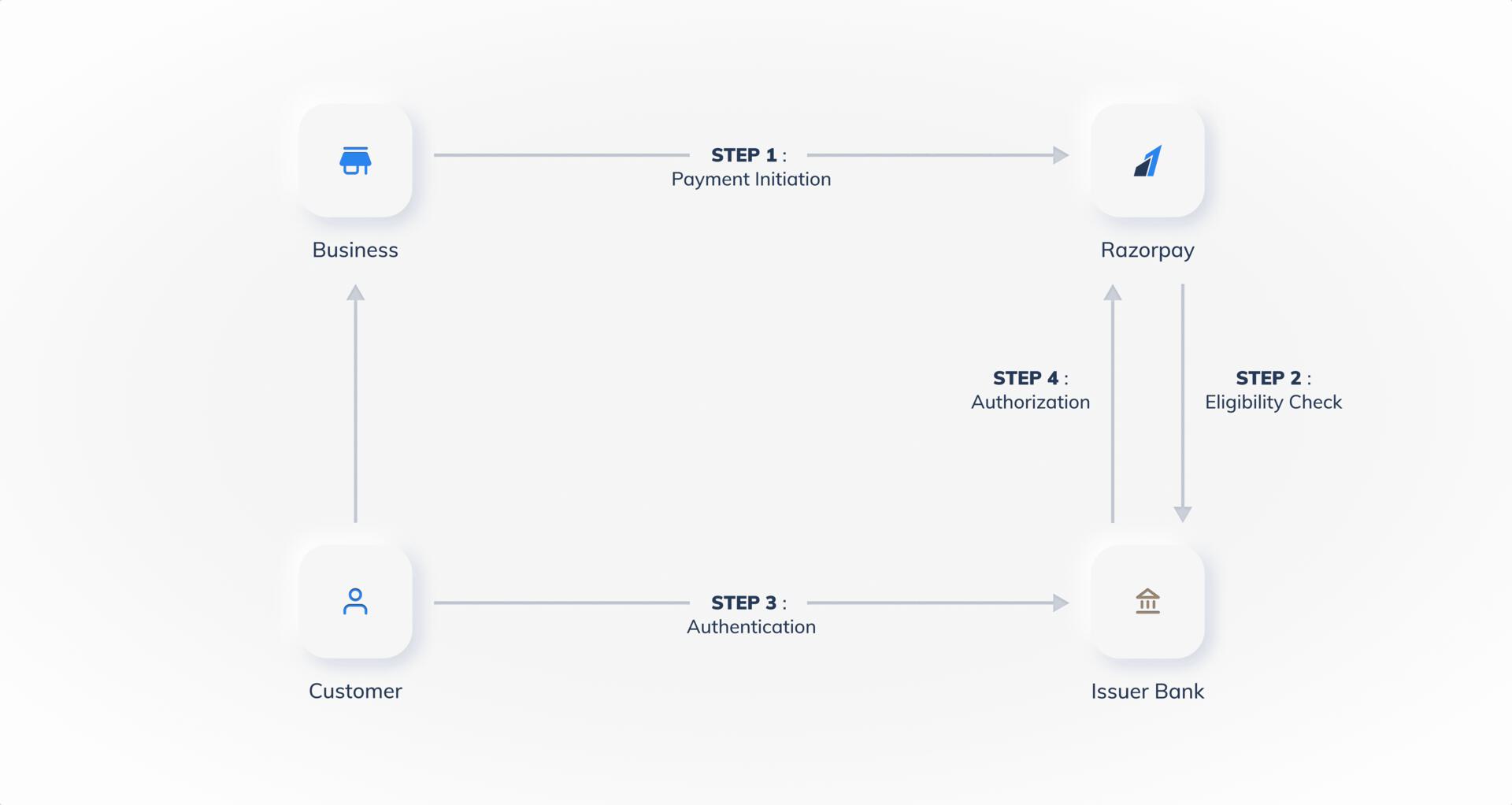
The payment flow for Wallet payments is illustrated below:
Source Parameter
Step Parameter
The possible values for the source parameter for wallet are listed below:
customer
business
internal
issuer
The possible values for the step parameter, along with the description, are listed below:
payment_initiation
Your system initiates and sends the payment request to our server. Our server sends the same request to the Bank/Gateway.
payment_eligibility_check
Razorpay Curlec sends the eligibility check request to the issuer to determine if the entered customer information is correct.
payment_authentication
Customer authenticates the payment using OTP provided by the issuer.
payment_authorization
Issuer authorises the release of funds and sends confirmation to Razorpay Curlec.